
User's Manual


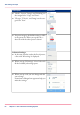


The presets and advanced settings
1
2
3
#
FunctionComponentNr
The preset tiles show the default settings for your job.
•
The presets are divided into categories, such as 'Media',
'Layout' etc.
•
When you tap a preset tile, it gives quick access to a
short list of other presets you can choose.
preset tiles1.
The job pane helps to manage jobs.
•
Information is given on your job.
•
Make sets.
•
Delete a job.
•
Tap a tile to switch between the presets/settings window
and a window with a preview of the document (only
for Smart Inbox jobs).
•
Start a job with the green button.
job pane2.
Chapter 2 - Get to Know the Printing System 51
Presets and advanced settings