
User's Manual


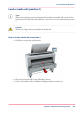


Unpack the media roll
Attention:
Handle the media roll with care. A dented media roll can damage the printer.
Attention:
Please refer to the list of ‘Preferred Océ media types and sizes’ on page 365 to find the corre-
sponding media name that you must select.
Attention:
Always write the correct media name inside the core, after you unpack the media roll. In
that case you will have the correct media information available, when you replace the roll
before it is empty and you want to re-use it later,.
1.
Place the media box on a table and open it.
Chapter 5 - Maintain the Printing System 297
Unpack the media roll