
User's Manual




2.
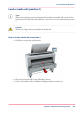
Roll the media back manually, to remove the media from the metal paper guide.
1
3.
Use both hands (as indicated) to lift the roll holder with the media roll, and put it on the
roll loading station.
4.
Pull the handle of the roll holder locking mechanism towards you, and remove the roll
holder from the core of the media roll.
Chapter 5 - Maintain the Printing System 295
Remove a media roll