
User's Manual


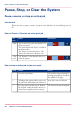




How to stop an active print job in Océ Express WebTools
#
ResultActionStep
Open the 'Jobs' tab.1
The system aborts and deletes
the job.
In the 'Jobs - Queue' section tick the box
in front of the job you want to delete and
click 'Delete'.
2
Chapter 4 - Use the Printing System 275
Pause, resume, or stop an active job