
- The O'Neil microFlash Series of Printers
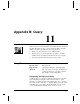






User Manual and Technical Guide The O'Neil microFlash Series of Printers Appendix B: Query • 109
ESC
{IR?}
Infrared
Query Format:
ESC{IR?}
Reply Format:
{IR!
P
:x;
AV
:x;
DV
:x;
IV
:x;
IN
:x;
ID
:x}
Function:
Returns information about the current infrared settings.
Reply Example:
{IR!
P
:IrDA;
AV
:00;
DV
:00;
IV
:1.02;
IN
:microFlash2;
ID
:1234567890123456789}
Reply Explanation:
IR! This is a reply to an INFRARED query.
P:
IrDA; This printer has the IrDA protocol turned on.
AV
:00; The ASK version is 00.
DV
:00; The DIRECT version is 00.
IV
:1.0-06; The IrDA version specification supported is 1.0.
and the firmware is version 06.
IN
:microFlash2; The device nickname is microFlash 2.
ID
: The device name is 1234567890123456789.
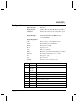
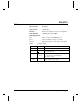
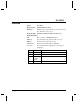
Query Reply Definition
P
OFF,IrDA,ASK,
ASC-CRC,
DIRECT,
DIRECT-CRC
P
rotocol selected is OFF, IrDA, ASK,
ASK with CRC, DIRECT or DIRECT with
CRC
AV
nn
A
SK software
V
ersion = nn
DV
nn
D
IRECTS software
V
ersion = nn
IV
n.n-mm
V
ersion of
I
rDA specifications supported
is n.n; firmware version of IrDA loaded
into this printer is mm.
IN
x..x
(up to 19 chars)
microflash2,
microFlash3, 2t,
2i
I
rDA
N
ickname
ID
x..x
(up to 19 chars)
I
rDA
D
evice name