
9.0

7
Dictating Names, Numbers,
Punctuation & Special Characters
Dragon NaturallySpeaking User’s Guide
87
If you are having problems dictating numbers, currency, times, or
dates, make sure that your Regional Settings match the language (dialect) you
selected when you created your user.
Changing the format of a number
If Dragon NaturallySpeaking enters a number in a format you don’t
want, you can use voice commands to convert it to a numeral or to
spell it out.
For example, you can change “seven dollars” to “$7” (US/Canada) or
“seven pounds” to “£7” (Other Dialects) by saying “Format That
Number.”
And you can change “$7” to “seven dollars” (US/Canada) or “£7” to
“seven pounds” (Other Dialects) by saying “Format That Spelled Out.”
These commands change the last number dictated or a selected
number.
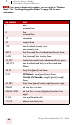
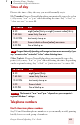
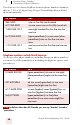
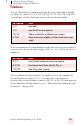
$99.50 ninety nine dollars and fifty cents
45.35 45 Euros and thirty-five cents
£120.35 pound sterling sign one hundred and twenty
point thirty five [All Dialects]
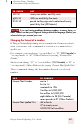
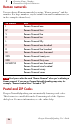
SAY TO CHANGE
Format That Number one to 1
first to 1st
nineteenth to 19th
5 million to 5,000,000
five million to 5,000,000
eight dollars to $8 (US/Canada)
seven pounds to £7 (Other Dialects)
Format That Spelled Out 4th to fourth
27 to twenty-seven
5,000,000 to five million
TO ENTER SAY
NOTE