
9.0

4
Working on your Desktop
Dragon NaturallySpeaking User’s Guide
48
Moving the mouse pointer and
clicking the mouse
Dragon NaturallySpeaking provides hands-free mouse control with
MouseGrid and the mouse motion voice commands. You can use these
features to position the mouse pointer anywhere on the screen, click
the mouse buttons, and drag objects—all by voice.
Moving the mouse pointer with MouseGrid
You can position the mouse pointer anywhere on the screen by using
MouseGrid. You can move the pointer relative to the full screen or the
active window.
To use MouseGrid:
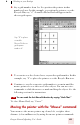
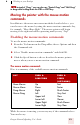
1 Say “MouseGrid” to place the MouseGrid over the full screen (as in
this example) or say “MouseGrid Window” to place it over the active
window. For example: