
9.0

4
Working on your Desktop
Dragon NaturallySpeaking User’s Guide
46
Pressing key combinations
When you’re pressing keys, you can press any combination of the
modifier keys (
SHIFT, CTRL, and ALT) at the same time as another
key, such as a letter. For example, you can say:
■ “Press Control Z” (undoes last action)
■ “Press Alt F” (opens File menu)
■ “Press Shift Tab” (moves backward through dialog box options)
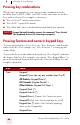
Dragon NaturallySpeaking ignores the command “Press Control
Alt Delete” (the keyboard shortcut for restarting a computer).
Pressing function and numeric keypad keys
To press a function key (F1 to F12), say “Press Function” and then the
name of the key. For example, say “Press Function 1” to bring up the
online Help.
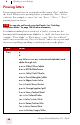
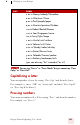
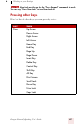
To press the keys on the numeric keypad, say “Press Keypad” and then
the name of the key. For example, you can say “Press Keypad Minus” to
press the keyboard shortcut that opens the Correction Menu. See the
complete list below:
SAY THEN
Press Keypad 1
Keypad 9 (you can say any number from 0 to 9)
All Dialects: Keypad Point (.)
US/Canada: Keypad Period (.)
Other Dialects: Keypad Full Stop (.)
Keypad Slash (/)
Keypad Asterisk (*)
Keypad Minus (-) (opens the Correction menu)
Keypad Plus (+) (turns the microphone on or off)
Keypad Star (*) (opens the NaturallySpeaking
menu on the DragonBar)
Keypad Enter
NOTE