
9.0

4
Working on your Desktop
Dragon NaturallySpeaking User’s Guide
44
Pressing letters
You can press any letter on your keyboard by saying “Press” and then
the letter. When you’re pressing letters, you must say “Press” before
each one. For example, to enter “txt,” say “Press t,” “Press x,” “Press t,”
pausing between letters.
You can also spell words using Spell mode. See “Switching
Recognition Modes” on page 108 for more information.
For similar-sounding letters (such as b, d, and v), you can use the
International Communications Alphabet to “spell” the letter keys, for
example, “Press alpha” or “Press bravo” or say “Press d as in David,”
and so on (you can also say “Press d for David,” and so on) as you would
if you were spelling something to another person over the phone.
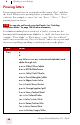
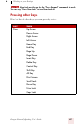
SAY THEN
Press a
b
any letter a–z or any international alphabet word
alpha through zulu
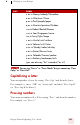
a as in Albert/Alice/alpha
b as in Bill/Buffalo/bravo
c as in Cathy/Carl/Charlie
d as in David/daughter/delta
e as in Edgar/enter/echo
f as in Frank/fancy/foxtrot
g as in George/gopher/golf
h as in Henry/helmet/hotel
i as in Iris/Ireland/India
j as in John/justice/Juliet
k as in Karen/kitchen/kilo
l as in Larry/lemon/lima
m as in Mickey/magic/Mike
TIP