
9.0

4
Working on your Desktop
Dragon NaturallySpeaking User’s Guide
42
Resizing and closing windows
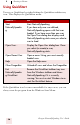
To resize and close windows, say “Click” and then one of the following
window commands:
“Click” is NOT optional for the Control menu commands.
If you have trouble getting Dragon NaturallySpeaking to recognize
any of the window commands, you can open the Control menu by saying
“Click Control Menu” and then say them.
Scrolling in windows and list boxes
You can scroll vertically in a window (for example, an online Help
window) or list box by saying “Move Down” and “Move Up” and then a
SAY THIS TO
Click Minimize or
Click Control Menu
(pause) Minimize
Minimize the active window.
Click Maximize or
Click Control Menu
(pause) Maximize
Maximize the active window.
Click Restore or
Click Control Menu
(pause) Restore
Restore window to previous size.
Click Close or
Press ALT F4
Close the active program.
Press CTRL F4 Close the active document, not the
whole program (works in many
programs).
Click Start Menu or
Click Start or
Press CTRL ESC
Open the Windows
®
Start Menu.
NOTE
TIP