
9.0

2
Installation and Training
Dragon NaturallySpeaking User’s Guide
11
Click Next to continue.
5 You can enable the Dragon NaturallySpeaking QuickStart option.
By enabling QuickStart, Dragon NaturallySpeaking launches at
system startup time and adds the Dragon NaturallySpeaking
QuickStart icon to the Windows task bar. For more information on
the QuickStart option, see “Using QuickStart” on page 34.
6 Upgrade only: If you are upgrading from Version 7 or 8, you can
select to upgrade your users as part of the Version 9 installation by
checking “Upgrade existing speech files to work with this
installation.” You may be prompted later to re-train some of your
existing users.
You can upgrade your V7 or V8 users at a later time by running the
User Upgrade Wizard from the Open User dialog box once the
product is installed. For more information, see the online help.
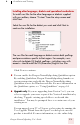
Installing other languages, dialects and specialized vocabularies
To install user files for the other languages or dialects supplied
with your edition, choose “Custom” from the setup screen and
click Next.
Select the user file for the dialect you want and click Next to
continue the installation
The user files for each language or dialect contain both spellings
and pronunciations specific to that region. For example, users
who wish to dictate US English spellings—including users with
accents—should install the US (American) English user files.