
9.0



7
Dictating Names, Numbers,
Punctuation & Special Characters
Dragon NaturallySpeaking User’s Guide
108
You can change the formatting properties of a word (such as
whether Dragon NaturallySpeaking should type a space before or after the
word) by using the Word Properties dialog box. See the online help for more
information.
Switching Recognition Modes
Dragon NaturallySpeaking lets you use different recognition modes in
your dictation. Dragon NaturallySpeaking uses normal mode by default.
In normal mode, the program distinguishes between words, numbers,
and commands.
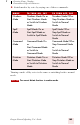
In addition to normal mode, there are four additional modes:
■ Numbers mode—The software recognizes only numbers,
commands, and punctuation. If you are dictating only numbers
(including currencies), working in this mode will increase
recognition accuracy.
■ Spell mode—The software recognizes only letters, numbers,
commands, and punctuation. In Spell Mode, Dragon
NaturallySpeaking allows you to say any combination of letters,
digits, or symbols you might need dictate part numbers or license
plate numbers. You can also say keystrokes such as space bar or
backspace key. Spell Mode is also useful for dictating internet or
Web addresses.
■ Command mode—The software interprets everything you say as a
command and nothing is interpreted as dictated text.
■ Dictation mode—The software interprets everything you say as
dictation and nothing is interpreted as a command, except for a few
commands such as “New Line” and “New Paragraph.”
To changes modes, you can:
1 Select the Words menu on the DragonBar and click the name of
the mode you want.
NOTE