
9.0



7
Dictating Names, Numbers,
Punctuation & Special Characters
Dragon NaturallySpeaking User’s Guide
107
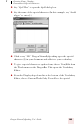
9 Click Train. The Train Words dialog box opens.
10Click Go and say the name of the character, as shown in the Train
Words dialog box. For example, say “double dagger.”
11Click Done to close the Train Words dialog box.
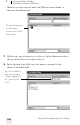
12The Vocabulary Editor now has two words in the vocabulary with
the same written form. One has a spoken form and one does not.
Click on the word that does not have a spoken form and click
Delete. This leaves the word that does have a spoken form in your
vocabulary.
13Click Close to close the Vocabulary Editor.
Now when you dictate the character name (in this example, “double
dagger”), Dragon NaturallySpeaking should enter the special character,
not the words.
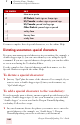
You can perform this operation more quickly by directly opening the
Vocabulary Editor, and directly adding the written and spoken form.
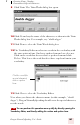
Click the word (the
special character)
with no spoken
form.
TIP