
9.0



7
Dictating Names, Numbers,
Punctuation & Special Characters
Dragon NaturallySpeaking User’s Guide
106
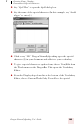
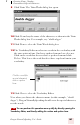
character you just entered under the Written form column, as
shown in this illustration.
7 Click on the special character to select it. In the illustration above,
the special character is already selected.
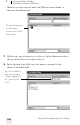
8 In the Spoken form field, type the name you want for this
character and click Add.
The special character
you dictated is
shown in the Written
form column.
Type the character’s
name (for example,
“double dagger”) in
the “Spoken form”
field.