
9.0



7
Dictating Names, Numbers,
Punctuation & Special Characters
Dragon NaturallySpeaking User’s Guide
103
■ Use the “No Caps On” and “No Caps Off” commands to enter an
e-mail or Web address in all lowercase letters. For more information
about controlling capitalization, see “Dictating consecutive words
in all lowercase letters” on page 79.
You can create Text and Graphics custom commands for e-mail and
Web addresses you use often. See the online help for more information.
Dictating special characters
Dictating common special characters
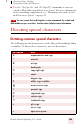
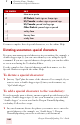
The following special characters are in the Dragon NaturallySpeaking
vocabulary. To dictate these characters, just say their names.
TO ENTER SAY
&ersand or and sign
* asterisk
@at sign
` backquote
©copyright sign
^ caret
° degree sign
$ dollar sign or dollar
euros or euro sign
% percent sign
®registered sign
§ section sign
™ trademark sign
+ plus sign
-minus sign
« open euro quote
TIP