
9.0

7
Dictating Names, Numbers,
Punctuation & Special Characters
Dragon NaturallySpeaking User’s Guide
99
Including hyphens as you dictate
To hyphenate words that Dragon NaturallySpeaking doesn’t
hyphenate automatically, just say “hyphen” wherever you want a
hyphen.
You can hyphenate words you just dictated with the command
“Hyphenate That.” Select the words you want to hyphenate and say
“Hyphenate That.” If you say this command when no words are
selected, Dragon NaturallySpeaking will usually hyphenate the last
few words that you said.
Removing hyphens
You can remove a hyphen by selecting it and replacing it with a space.
To remove a hyphen:
1 Say “Select hyphen.”
2 Say “Space Bar.”
Preventing hyphens
You can prevent Dragon NaturallySpeaking from entering a hyphen
by pausing where the hyphen would normally be.
For example, to type “long lasting” (normally hyphenated) say “long,”
then pause for a moment, and then say “lasting.” Or you can say “long
space bar lasting” without pausing, to insert a space in place of the
hyphen.
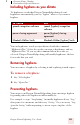
TO ENTER SAY
speech-recognition software speech [hyphen] recognition
software
power-sharing agreement power [hyphen] sharing
agreement
Elizabeth Walker-Smith Elizabeth Walker [hyphen] Smith