
9.0

7
Dictating Names, Numbers,
Punctuation & Special Characters
Dragon NaturallySpeaking User’s Guide
97
You can use the Vocabulary Editor to view or change the formatting
properties of the punctuation. For more information, see the online
help.
Words that end with ’s
To dictate a word ending with (apostrophe) ’s, just say it as you
normally would. Dragon NaturallySpeaking will often add it. If
Dragon NaturallySpeaking doesn’t include the ’s, you can add it later.
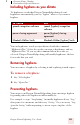
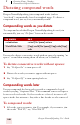
Including ’s as you dictate
When you want to make sure that Dragon NaturallySpeaking types a
word with ’s, say “apostrophe ess” after saying the word. For words that
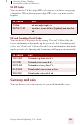
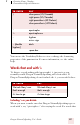
) close paren (US/Canada)
right paren (US/Canada)
right parenthesis (All Dialects)
close parenthesis (All Dialects)
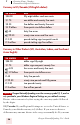
‘ apostrophe
‘s apostrophe-ess
-hyphen
minus sign
-- [double
hyphen]
dash
space bar
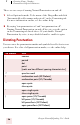
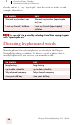
TO ENTER SAY
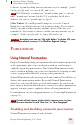
We took Mary’s car We took Mary’s car
that’s enough that’s enough
it’s time to go it’s time to go
TO ENTER SAY