
9.0

7
Dictating Names, Numbers,
Punctuation & Special Characters
Dragon NaturallySpeaking User’s Guide
96
There are two ways of turning Natural Punctuation on and off:
1 Select Options from the Tools menu of the DragonBar and click
"Automatically add commas and periods" on the Formatting tab.
For more information on this, see the online help.
2 By saying "autopunctuation on" and "autopunctuation off".
Turning Natural Punctuation on and off by voice sets the option
on the Formatting tab listed above. If your disable Natural
Punctuation by voice, it stays disabled until to enable it again.
Dictating Punctuation
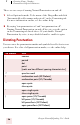
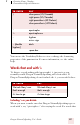
You can enter the punctuation marks and symbols listed below in text
you dictate. For a list of all punctuation marks, see the online help.
TO ENTER SAY
,comma
. period
dot
point
[each one has different spacing characteristics]
?question mark
! exclamation mark (All Dialects)
exclamation point (US/Canada)
“ open quote
close quote
‘ open single quote
close single quote
( open paren (US/Canada)
left paren (US/Canada)
left parenthesis (All Dialects)
open parenthesis (All Dialects)