
9.0


7
Dictating Names, Numbers,
Punctuation & Special Characters
Dragon NaturallySpeaking User’s Guide
92
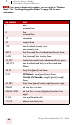
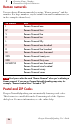
Roman numerals
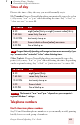
You can dictate Roman numerals by saying “Roman numeral” and the
number. For large numbers, say the number in small combinations (as
in the examples shown here).
Don’t pause after the word “Roman Numeral” when you’re dictating a
Roman numeral. If you pause, Dragon NaturallySpeaking may enter, for
example, “Roman numeral three” instead of “III.”
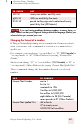
Postal and ZIP Codes
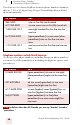
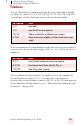
Dragon NaturallySpeaking can automatically formats postal codes.
This feature is controlled from the Formatting tab of the Options
dialog box. For more information, see the online help.
TO ENTER SAY
I Roman Numeral one
IV Roman Numeral four
VRoman Numeral five
X Roman Numeral ten
LRoman Numeral fifty
C Roman Numeral one hundred
D Roman Numeral five hundred
M Roman Numeral one thousand
XXIV Roman Numeral twenty our
XXXI Roman Numeral thirty one
MCMXCVII Roman Numeral one thousand
Roman Numeral nine hundred
Roman Numeral ninety
Roman Numeral seven
TIP