
User's Manual
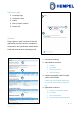
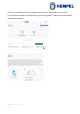
Table Of Contents

Hempasense Track Version 1.5
Page | 26
MyHempel
MyHempel is Hempel’s Digital Customer Interface. To set up new jobs and create the
Hempasense Track report simply log on your MyHempel account from a web browser.
From the MyHempel Home Page you will be able to find the icon Hempasense Track.
Click on this icon and you will be presented to the Hempasense Track software, web ver-
sion.
Create new users
The main user account can invite colleagues to join the Hempasense Track software. In-
vite relevant people from your organization to access your Hempasense Track profile. This
could for example be Quality Managers, Foremen, Applicators, Office Workers or other im-
portant people being a part of the Hempasense Track process. The invited users will both
be able to log in on the software via MyHempel and the Hempasense Track mobile app.
To find information on how to add a new user:
1. Log in to your MyHempel profile
2. Press “Account”
3. Go to “Help Centre”
4. Select the FAQ: “How to create new user”
The customer main user, marked with a start, can at any time deactivate any User by
changing the email of the User, deleted the User and edit the User’s account permission.