
User's Manual
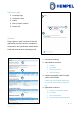
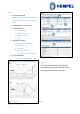
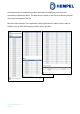
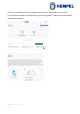
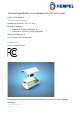
Table Of Contents

Hempasense Track Version 1.5
Page | 21
Sensors
To get to this page, click the settings-wheel in the top left corner
on the mobile app. On this page you can see an overview of all
your sensors, and what ambient temperature and relative hu-
midity each of them are currently measuring. You can also see
their battery level, and the date of the last received signal – so
you can see if all your sensors are working correctly.
Notice: you should not change the battery of the sensor at any
time. You will automatically, as part of the service agreement
receive a new sensor replacing the current one, before it runs
out of battery.
Hempasense Track Report
When the job has been executed and all coats have status “Done”, ensure that the needed
custom field labels have been specified with values. Log on MyHempel via the web app to
create the Hempasense Track Quality Report. Select the finalized job from the your job list
and fill in the Summary and Report text (if not already specified).
Press “Report” and the report will be available to download as PDF.
The report includes:
• All time and date stamps from the shakes of the sensor during the job, indicating
when different stages of the job started or were completed.
• The monitored ambient temperature and relative humidity by the sensor. The inter-
val of this environmental data recorded to the report is based on the pre-set interval
of the sensor.
• Specification used when creating the job, component specified for each coat, equip-
ment specified to be used during the job, values entered for the template’s custom
fields, graphs and table overview of monitored RH and AT per coat.