
User's Manual
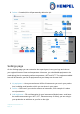
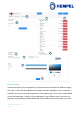
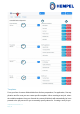

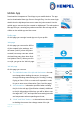
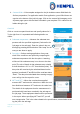
Table Of Contents

Hempasense Track Version 1.5
Page | 19
4. Custom fields – if the template assigned to the job includes custom field labels for
Surface preparation, Pre application and/or Post application, you will find these cat-
egories at the bottom of the job info page. Click on the custom field category and a
separate page opens with the labels included in your template. Fill in values for the
labels during the job.
Coat info
Click on a coat to expand it and see and specify values for it.
To the right Coat 1 is expanded and following details are
visible:
1. Substrate temperature – Measure the substrate tem-
perature with the specified equipment (Selected in the
Job page on the web app). Enter the value in the mo-
bile app by pressing the blue button “Sub. temp” for the
coat you are about to apply.
2. Dew point – Before starting application of any coat,
check if the conditions are optimal by comparing the
substrate temperature with the dew point. A warning
will show if the substrate temp. is too close to the dew
point (The rule of thumb is that substrate temp. should
at least be above +3°C or +5°F from the dew point). The
dew point will consciously be calculated based on the
sensors’ monitored AT and RH until the coat has status
“Done”. The dew point calculated when starting to apply
coat x will go into the report for coat x.
3. WFT and DFT – When the coat has been applied
measure WFT and enter the value here. When the coat
has dried/cured measure DFT and enter the value here.
The details of the equipment that the measurement is
performed with have been recorded in the web app at
the job page. These equipment details will be presented
in the report. When specifying WFT and DFT you will
see a target value. This is the value related to the specification, entered when creat-
ing the job in the web app.
1
2
5
4
3
2
3