
User's Manual

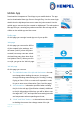
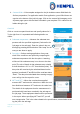
Table Of Contents

Hempasense Track Version 1.5
Page | 18
Mobile App
Download the Hempasense Track App to your mobile device. The app
can be downloaded from App Store or Google Play. Use the same login
details from the MyHempel account to enter the jobs created. Use the
mobile app to execute the jobs created on MyHempel. The web and mo-
bile app will sync, meaning any values entered in the web app will be
visible on the mobile app and vise verse.
Profile page
On this page you can sign in and sign out of your profile.
Jobs page
On this page you can see the full list
of jobs created in the web app, incl.
the name (Job ID), when they were
created, how many coats are sched-
uled and how many have been final-
ized (status “Done”). When you click
on a job, you get to the Job info page.
Job info page
On this page you can see:
1. The individual coats of the job and their status – the sta-
tus change when shaking the sensor. A coat goes
through following status during a job: Pending, Coating,
Drying or Done. Click on a coat and it expands in order
for you to enter more information (See Coat info page),
2. Job information – information specified when creating
the job in the web app (Specification related). Additional
to the job information visible here you will be able to see
the target WFT, DFT and specified overcoating intervals
and temperature when expanding each coat,
3. “Undo” and “Next” buttons – to be used as an alternative
to shaking the sensor thus change status of the job.
1
2
3
4