
User's Manual
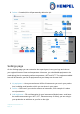
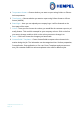
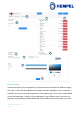
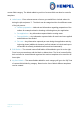
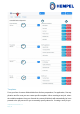
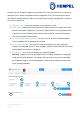

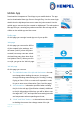
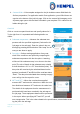
Table Of Contents

Hempasense Track Version 1.5
Page | 14
custom field category. The labels added to your list of custom fields can later be sorted in
templates.
1. Label name – Enter relevant areas or factors you would like to include values for
during the job and press “+”. The labels can be categorised into four different areas
of the job process:
a. Surface preparation – Methods and information regarding preparation of the
surface for example related to cleaning or blasting done prior application.
b. Pre application – Any information captured before coating starts.
c. Post application – Any information captured after all coats have been applied
and dried/cured has ended.
d. Per coat – Any information captured per coat during the application and dry-
ing/curing phase (additional elements you find relevant to include and report
on besides the already included elements and environmentals).
2. Edit /Delete – The entered custom field labels will be added to your list to the right.
From here you can always edit the labels or delete them. The list of custom field la-
bels can later be structured and organized into various templates to be used for dif-
ferent jobs.
3. My list of labels – The named labels added for each category will go to the “My” lists
of custom field divided by category. Based on the lists of labels different templates
can be created.