
User's Manual
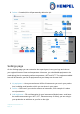
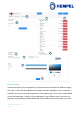
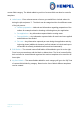
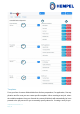
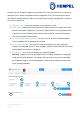

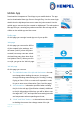
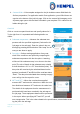
Table Of Contents

Hempasense Track Version 1.5
Page | 12
4. Temperature format – Choose whether you want to report using Celsius or Fahren-
heit temperatures.
5. Time format – Choose whether you want to report using 24hour format or 12hour
format (AM/PM)
6. Brand logo – Here you can upload your company logo. It will be featured on the
front page of the report.
7. Colors – Here you can choose the colours you would like the customer report to pri-
marily feature. This could for example be your company colours. Click on the line
you want to change, and then click on the colour you want to change it to.
8. Save – Click here to save the changes you have made.
9. Custom fields / Templates – Press Custom fields to capture other relevant infor-
mation during the job. The information can be categorised into: Surface preparation,
Pre application, Post application or Per coat. Press Templates and you can struc-
ture your customer fields into various templates to be used for different jobs.