
User's Manual





78
Editing Settings
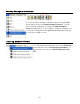
Simply use the settings menu on the left side of the screen to find the settings you wish to edit.
Individual settings appear in the right side of the screen. Changes can be saved to a file on
your PC and/ or sent to the Sensor.
Saving Settings
Settings can be saved by choosing the File menu and choosing
either Save or Save As… . Choosing Save saves the settings to
the current file name. Choosing Save As… lets you pick a file
name. You can also save your current settings use the Save and
Save As toolbar buttons. I f you forget to save and then try to exit
the Digital RC Desktop, you will be prompted to save.