
User's Manual



50
Steering (Ch1)
Throttle (Ch2)
Shift (Ch3)
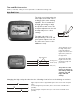
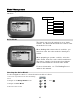
Low End Point
On the driving screen,
the low end point is
represented by the
length of the bar to the
left of the pointer on
the lower bar.
The greater the left
length of the bar, the
greater the low end
point value.
The position of the
pointer on the bar is
affected by end point
settings ( low and
high) and trim
setting.
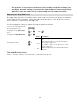
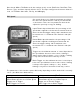
Changing the low end point value has the following visual effect on the driving screen bars.
Low end point value is approximately the same as the high end point
value.
Increased low end point value (more servo travel on LOW end is
possible).
Decreased low end point value (less servo travel on LOW end is
possible).
The position of the pointer on the bar is affected by end point settings (low
and high) and trim setting; increasing the low end point value may visually
appear to have the same effect as decreasing the high end point value.
Adjusting the Low End Point
The low end point value is a relative value, and is expressed as the percentage of full travel to
the LOW end. For example, setting the low end point value to “50” allows the servo to move
only 50% of full travel to the low end.
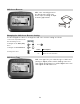
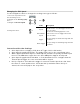
Use the navigation controls to adjust the low end point as follows:
1. Access the top function menu
from the driving screen.
men
u
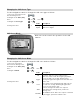
2. Navigate to the Shift ( Ch3)
menu.
or : then
3. Navigate to Low End Point.
or
Value Description
0
Minimum low end point; allows NO travel to low
end.
1-99
Low end point value is set to a percentage of
travel range to low end.
For example, a value of “50” gives 50% of full
travel to low end.
4. Change the value.
or
100
Maximum low end point; allows FULL travel to low
end.