
Operation Manual




Overview Using Camera Control Pro
Return to fi r s t page
84
Appendices
Device Registration Windows XP 4/4
6
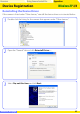
Confi rm that “This device is working properly” appears under “Device status” in the
“General” tab of the camera “Properties” dialog.
5
Click Finish.
4
Pressing the shift key to prevent the “Select Region” dialog from opening automati-
cally, insert the Camera Control Pro CD. Select Install the software automati-
cally and click Next.