
Operation Manual






Overview Appendices
Return to fi r s t page
60
Using Camera Control Pro
The Camera Menu 2/4
Fine-Tune White Balance…
D200
D2-series
D1-series
D70S
D70
D100
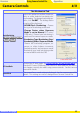
Selecting this op tion displays the dialog shown at right, where
white bal ance can be fi ne-tuned be tween –3 and +3. The
value selected for Auto will be added to the white balance
setting the camera chooses for auto white balance. Click ing
Re set re turns all values to defaults. Click OK to ap ply the
cur rent set tings to the cam era, or click Cancel to dis card any
chang es and return to the Camera Control Pro win dow.
Set Color Temperature…
D200
D2-series
Selecting this op tion displays the dialog shown at right, where
color temperature can be chosen from a menu. The value
chosen takes eff ect whenever Choose color temp. is select-
ed for white balance. Click OK to ap ply the cur rent set tings to
the cam era, or click Cancel to exit without saving changes.
Measure White Balance…
Use this op tion to measure preset white balance. If the cam era
cur rent ly con nect ed sup ports multiple values for preset white
bal ance, the set ting that will be used to store the mea sured
val ue can be cho sen from the pop-up menu at the top of the
dialog. Adjust camera set tings as de scribed in the sec tion on
preset white balance in the camera user’s man u al and click OK
to measure a value for white bal ance.
Set Color Temperature…
D200
D2-series
The desired results may not be achieved with fl ash or fl uorescent lighting.
Choosing a Mode
D70S
D70
D50
The Measure White Balance… option is only available in P, S, A, and M modes.
D2Xs (dialogs for other cameras may
diff er)