
Operation Manual






Overview Appendices
Return to fi r s t page
55
Using Camera Control Pro
Camera Controls 10/12
Continuous Mode
D70S
D200
D70 D50
D2-series
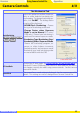
When a D2-series, D200, D70S, D70, or D50 camera is connected, the amount of memory remaining
in the camera memory buff er is displayed at the right edge of the simulated LCD panel. This infor-
mation is updated at regular intervals, but temporary discrepancies may exist between the display
and the actual amount of memory remaining in the buff er.
Non-CPU Lenses
The following restrictions apply to Camera Control Pro when a non-CPU lens is mounted on the
camera (the operations listed can still be performed using the controls on the camera body; see the
camera manual for details):
D2-series
D200
D1-series
D100
D70S D70 D50
With lens data
No lens
data
Exposure
Mode
Can be selected from Aperture-
priority auto and Manual.
Can not be ad-
justed. Mode se-
lected with camera
displayed. Photos
can only be taken
in mode M.
Can only be adjusted
if
Enable controls on
Enable controls on
the camera body
the camera body is
not checked. Otherwise
same as D100.
Shutter
Speed
Can only be adjusted in manual exposure mode.
Aperture
Shown with as-
terisk.
Aperture shown as “f/--”. Can not be adjusted.
AF and
Shoot
Can not be used.
Shoot Can be used.*
* If D100, D70S, D70, or D50 is connected and set to an exposure mode other than manual, a warning will be displayed.