
Operation Manual






Overview Appendices
Return to fi r s t page
53
Using Camera Control Pro
Camera Controls 8/12
The Mechanical Tab
Auto Bracketing
D200
D2-series
D70S
D50D70
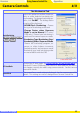
Select this option to perform exposure,
fl a s h , o r w h ite balance bracketing dur-
ing shooting. To change bracketing op-
tions, click Set BKT. The dialog shown
at right will be displayed.
• AE/WB/Flash Bracketing: Choose
the type of bracketing performed.
• Change Factor when Exposure
Mode is set to Manual (D2 series/
D200 only): Choose how bracketing is
performed in manual exposure mode.
• Bracketing Type / Bracketing Step /
Bracketing Order / Ex posure Mo de:
Choose the bracketing program, ex-
posure or white balance increment,
bracketing order, and exposure mode.
Bracketing type and bracketing order
are not available with the D50.
AF-Area Mode
Choose the AF-area mode. If
Enable controls on the camera body
Enable controls on the camera body is
checked (D2 series/D200 only), the current AF-area mode will be shown,
but changes can only be made using camera controls. See the camera
manual for details.
Fo cus Mode
The cur rent focus mode setting is displayed. See the cam era man u al for
details. This set ting can not be changed from Camera Control Pro.
D2 series / D200
D70S/D70/ D50