
Operation Manual




Overview Appendices
Return to fi r s t page
42
Using Camera Control Pro
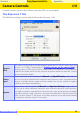
The Camera Control Pro Window 1/4
The Camera Control Pro window shows current camera settings, which may be viewed by
clicking the fi ve page selection tabs. Camera settings can be altered using the controls in
each tab as in “
Camera Controls
Camera Controls.” The other settings in this window are described below.
Connection Status
This area shows the following information about the camera currently connected:
Camera name
Camera orientation
D70S
D200
D70 D50
D2-series
If On or Automatic (the default setting) is selected for the auto image rotation option
in the camera setup menu, camera orientation will be indicated by an icon as shown
below. No icon will be displayed if Off is selected.
Horizontal Rotated 90 ° counterclockwiseRotated 90 ° clockwise
Connection status