
User's Guide


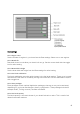


Table Of Contents
- Welcome to the Q Experience 2.0.
- Important information
- Introduction
- 1 Sidebar
- 2 View
- 3 Application
- 4 Home menu
- 5 Map
- 5.1 Map basics
- 5.2 Location properties
- 5.3 Navigation/ Set a destination
- 5.4 Map’s application menu
- Widgets
- 5.5 Chart settings
- Chart orientation
- Heading line
- Show trail
- Autocenter
- Autozoom speed limit
- Low speed zoom level
- Easy view™
- SonarChart™
- 2D shading
- Community edits
- Chart details
- Satellite overlay
- Satellite overlay opacity
- Default zoom level
- Safe water depth
- Shallow water depth
- Spot soundings
- Depth contours
- Minimum fishing range
- Maximum fishing range
- Reset chart settings
- 5.6 Location and route properties
- 6 Dashboard application
- 7 Compact dashboard widget
- 8 Fishfinder
- 9 Radar
- 10 Music
- 11 Weather
- 12 Info
- 13 Settings
- 14 Q Mobile App
- 15 Glossary

43
13.8.7 Fuel sensor 1 & 2 input
Select the correct fuel sensor inputs from the Boat settings:
• None
• A
• E
• NMEA
13.8.8 Trim calibration & Speed update interval
Here you can adjust your engine to lowest position with trim calibration. You can also adjust
your speed update interval to:
• Very slow
• Slow
• Normal
• Fast
13.9 Unit settings
Unit settings allow you to change the various units used in instruments, navigation data etc.
Unit settings
13.9.1 Date format
Select date format from the Unit settings:
• DD.MM.YY
• DD.MM.YYYY
• MM.DD.YY
• MM.DD.YYYY