
Owner's manual


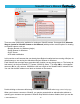




There are other options also available for locating an iViewHD camera. See appendix A (Alternate
Ways to Locate an iViewHD Camera on the Network) which provides several options for locating
an iViewHD camera, such as
•
Bonjour Browser for Windows (plugin)
•
Safari Browser for Windows
•
DHCP Server
•
ARP table modification
In this section we will assume that you already have Bonjour installed and are running a Bonjour en-
abled browser or are running the standalone Bonjour Browser for Windows.
Each iViewHD has a unique name associated with it which you can change later on. The factory de-
fault name is in the form iViewHD-TT Camera (XXXXXX), where TT is either 2M for a 2 megapixel
camera or D1 for a D1 camera. XXXXXX are the last 3 digits of the iViewHDʼs MAC address in hex.
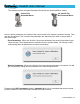
You can find the MAC address on a label on the back of the camera:
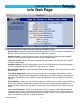
Double clicking on the name will attempt to connect to the iViewHD main image control web page.
When your browser connects to iViewHD, you may be greeted with an authentication window re-
questing your username and password. iViewHD ships with this feature disabled, but if you see the
iViewHD Userʼs Manual
© 2009 NetMedia, Inc. 13