
User's Manual



Use VPN to Access Your Network
139
Nighthawk AC1900 Smart WiFi Router Model R7000
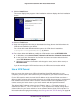
The OpenVPN Setup Wizard displays:
5. Click the Next button.
6. Read the License Agreement and click the I Agree button.
The Choose Components screen displays:
7. Leave the check boxes selected as shown, and click the Next button.
8. To specify the destination folder, click the Browse
button and select a destination folder.
The following screen displays: