
Quick Reference Guide




Reference Manual for the Model DG824M Wireless ADSL Modem Gateway
3-12 Connecting the Gateway to the Internet
5.
Click on the Test button to test your Internet connection. If the NETGEAR website does not
appear within one minute, refer to Chapter 8, “Troubleshooting”.
Wizard-Detected PPPoA Login Account Setup
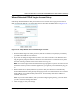
If the Setup Wizard determines that your Internet service account uses a login protocol such as
PPP over ATM (PPPoA), you will be directed to a menu like the PPPoA menu in Figure 3-10:
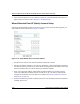
Figure 3-11: Setup Wizard menu for PPPoA login accounts
1.
Enter your Login and Password. These fields are case sensitive.
2. If you wish to change the login timeout, enter a new value in minutes. This determines how
long the gateway keeps the Internet connection active after there is no Internet activity from
the LAN. Entering a timeout value of zero means never log out.
Note: You will no longer need to launch the ISP’s login program on your PC in order to access
the Internet. When you start an Internet application, your gateway will automatically log you
in.
3. Choose how your IP Address is configured.