
User Manual






www.netcommwireless.comNetComm Wireless 4GM3W User Guide
55
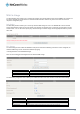
IPv6
The IPv6 page enables you to configure the settings used for an IPv6 connection (if supported by your Internet Service
Provider).
OPTION DEFINITION
IPv6 Select to enable or disable IPv6 functionality.
IPv6 Connection
Select the type of IPv6 connection to utilise for your service. You can select from:
6 to 4
IPv6 in IPv4 Tunnel
Select the type of connection as required by your Internet Service Provider for their IPv6 service.
DNS Setting Select whether to automatically obtain DNS Server addresses or use the ones you manually specify.
Primary DNS Address Enter the Primary DNS Address for the IPv6 connection.
Secondary DNS Address Enter the Secondary DNS Address for the IPv6 connection.
LAN IPv6 Address The IP Address to use for the IPv6 service connection.
LAN IPv6 Link-Local Address The current local LAN IPv6 address of the NF5.
Autoconfiguration Select to enable or disable IPv6 auto configuration (if supported by your Internet Service Provider).
Autoconfiguration Type
Select the appropriate type of auto configuration mode as required by your Internet Service Provider for their IPv6
service.
Router Advertisement
Lifetime
Enter the length of time between the router advertising its availability on the IPv6 connection.