
Operation Manual




73Chapter 17 . Settings
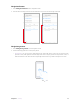
Navigation buttons
1. Select Navigation buttons as the navigation mode.
2. Select a button setting, and then the virtual buttons on your screen will change as desired.
Navigation gestures
1. Select Navigation gestures as the navigation mode.
2. Use the following gestures to control your phone:
• Back gesture: You can choose to slide left from the right edge of the screen only to go back to the
previous screen, slide right from the left edge of the screen only to go back to the previous screen, or
slide towards the center from the left or right edge of the screen to go back to the previous screen.