
Operation Manual




36Chapter 7 .
Camera and Photos
Camera and Photos
Use multiple features of your camera to capture your precious moments.
• Camera at a glance
• Take a photo
• Record a video
• Shooting mode
• Camera and video settings
• Photos
7. 1 Camera at a glance
Launch your camera
• On the Home screen: Tap Camera.
• On the Lock screen: Just swipe up.
• On the Lock screen: Press the volume down button twice to snapshot when the screen is off.
Note: The camera will enter the standby mode when not used for a period, you can tap the screen to wake it up.
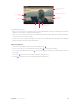
Camera screen
Switch flash modes
Switch HDR modes
Switch aspect ratio
Switch beauty mode
Toggle rear and fr
ont camera
Camera mode
Switch filters
Record a video
Take a photo
View the photos and
videos you’ve taken
Change shooting modes or
configure the camera settings
1. Tap
to display flash modes’ three options:
•
Disables the flash.
•
Enables the flash.
• Automatically enables or disables the flash based on the ambient brightness.
7