
Computer Systems Division Computer Hardware Service and Reference Manual
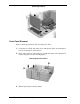




Table Of Contents
- Proprietary Notice
- Contents
- Preface
- Abbreviations
- Technical Information
- Utilities
- Option Installation
- Maintenance and Troubleshooting
- Disassembly and Reassembly
- Desktop -Illustrated Parts Breakdown
- MiniTower -Illustrated Parts Breakdown
- System Specifications
- Connector Pin Assignments
- System Resources
- Index
- FCC Statement
- Battery Replacement

5-4 Disassembly and Reassembly
Removing a Board
Front Panel Removal
Remove the front panel from the system unit as follows.
1. Locate the two plastic tabs at the front of the chassis. They are indicated by
two arrows engraved on the chassis.
2. Press down on the two tabs and press in a third tab at the end of the panel to
release the panel (see the following figure).
Releasing the Front Panel
A
– Release Tab
B
– Thumb Screw
3. Pull the panel away from the chassis.