
Electronics America Portable Projector User Manual



44
4. Convenient Features
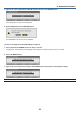
7. Type in the same combination of buttons and press the ENTER button.
The confirmation screen will be displayed.
8. Select [YES] and press the ENTER button.
The SECURITY function has been enabled.
Toturnontheprojectorwhen[SECURITY]isenabled:
1. Press and hold the POWER button for about 1 second.
Theprojectorwillbeturnedonanddisplayamessagetotheeffectthattheprojectorislocked.
2. Press the MENU button.
3. Type in the correct keyword and press the ENTER button. The projector will display an image.
NOTE: The security disable mode is maintained until the main power is turned off or unplugging the power cable.