
Display Solutions Projector Wired and Wireless Network Setup Guide NP2000, NP1000



32
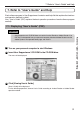
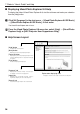
7. Refer to “User’s Guide” and Help
Reference
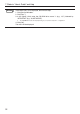
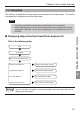
If the above menu is not displayed, follow these steps.
1. Click [Start] of Windows.
2. Click [Run...].
3. In the [Open:] field, enter the CD-ROM drive name *1 (e.g., “Q:\”) followed by
“SETUP.EXE” (e.g., “Q:\SETUP.EXE).
*1 The CD-ROM drive name will vary depending on your personal computer’s configuration.
4. Click [OK].
The menu will be displayed.