
Electronics America Portable Projector User's Manual


Table Of Contents
- INDEX
- Front cover
- Important Information
- 1. Introduction
- 2. Installation and Connections
- 3. Projecting an Image (Basic Operation)
- 4. Convenient Features
- (1) Turning off the Image and Sound
- (2) Freezing a Picture
- (3) Enlarging a Picture
- (4) Changing Eco Mode
- (5) Checking Energy-Saving Effect [CARBON METER]
- (6) Preventing the Unauthorized Use of the Projector [SECURITY]
- (7) Using the Optional Remote Mouse Receiver (NP01MR)
- (8) Network Setting by Using an HTTP Browser (NP215 only)
- 5. Using On-Screen Menu
- 6. Maintenance
- 7. Appendix
66
6. Maintenance
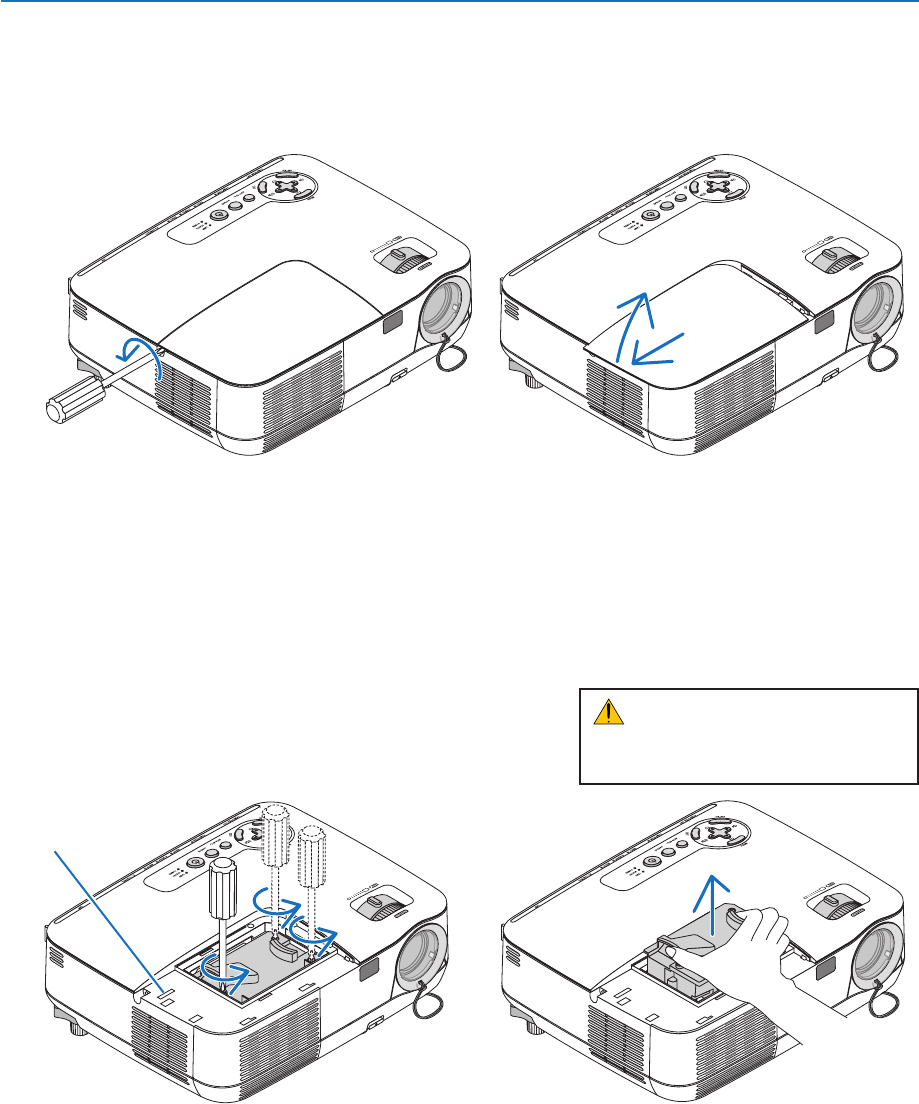
2. Remove the lamp housing.
(1) Loosen the three screws securing the lamp housing until the phillips screwdriver goes into a freewheeling condi-
tion.
•Thethreescrewsarenotremovable.
•Thereisaninterlockonthiscasetopreventtheriskofelectricalshock.Donotattempttocircumventthis
interlock.
(2) Remove the lamp housing by holding it.
1. Remove the lamp cover.
(1) Loosen the lamp cover screw
•Thelampcoverscrewisnotremovable.
(2) Push and slide the lamp cover off.
CAUTION:
Make sure that the lamp housing is cool
enough to before removing it.
Interlock