
Electronics America Portable Projector User's Manual
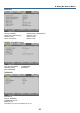


Table Of Contents
- INDEX
- Front cover
- Important Information
- 1. Introduction
- 2. Installation and Connections
- 3. Projecting an Image (Basic Operation)
- 4. Convenient Features
- (1) Turning off the Image and Sound
- (2) Freezing a Picture
- (3) Enlarging a Picture
- (4) Changing Eco Mode
- (5) Checking Energy-Saving Effect [CARBON METER]
- (6) Preventing the Unauthorized Use of the Projector [SECURITY]
- (7) Using the Optional Remote Mouse Receiver (NP01MR)
- (8) Network Setting by Using an HTTP Browser (NP215 only)
- 5. Using On-Screen Menu
- 6. Maintenance
- 7. Appendix
63
5. Using On-Screen Menu
Menu Descriptions & Functions [RESET]
[NP210/NP115/NP110] [NP215]
ReturningtoFactoryDefault[RESET]
The RESET feature allows you to change adjustments and settings to the factory preset for a (all) source (s) except
the following:
[CURRENTSIGNAL]
Resets the adjustments for the current signal to the factory preset levels.
Theitemsthatcanberesetare:[PRESET],[CONTRAST],[BRIGHTNESS],[COLOR],[HUE],[SHARPNESS],
[ASPECTRATIO],[HORIZONTAL],[VERTICAL],[CLOCK],[PHASE],[NOISEREDUCTION],and[TELECINE].
[ALLDATA]
Reset all the adjustments and settings for all the signals to the factory preset.
All items can be reset EXCEPT[LANGUAGE],[BACKGROUND],[FILTERMESSAGE],[SECURITY],[COMMUNI-
CATIONSPEED],[CONTROLID],[STANDBYMODE],[FANMODE],[CONTROLTERMINAL],[LAMPLIFERE-
MAINING],[LAMPHOURSUSED],[TOTALCARBONSAVINGS],and[NETWORKSETTINGS](NP215only).
Toresetthelampusagetime,see“ClearingLampHourMeter[CLEARLAMPHOURS]”below.
ClearingNetworkingSettings[NETWORKSETTINGS](NP215only)
Returns[DHCP],[IPADDRESS],[SUBNETMASK],and[GATEWAY]tothedefaultsettings.
ClearingLampHourMeter[CLEARLAMPHOURS]
Resetsthelampclockbacktozero.Selectingthisoptiondisplayssubmenuforaconrmation.Select[YES]andpress
the ENTER button.
NOTE:Elapsedtimeofthelampusewillnotbeaffectedevenwhen[RESET]isdonefromthemenu.
NOTE: The projector will turn off and go into standby mode when you continue to use the projector for another 100 hours after the
lamp has reached the end of its life. In this condition you cannot clear the lamp hour meter on the menu. If this happens, press the
HELPbuttonontheremotecontrolfor10secondstoresetthelampclockbacktozero.Dothisonlyafterreplacingthelamp.