
Electronics America Portable Projector User's Manual



Table Of Contents
- INDEX
- Front cover
- Important Information
- 1. Introduction
- 2. Installation and Connections
- 3. Projecting an Image (Basic Operation)
- 4. Convenient Features
- (1) Turning off the Image and Sound
- (2) Freezing a Picture
- (3) Enlarging a Picture
- (4) Changing Eco Mode
- (5) Checking Energy-Saving Effect [CARBON METER]
- (6) Preventing the Unauthorized Use of the Projector [SECURITY]
- (7) Using the Optional Remote Mouse Receiver (NP01MR)
- (8) Network Setting by Using an HTTP Browser (NP215 only)
- 5. Using On-Screen Menu
- 6. Maintenance
- 7. Appendix
59
5. Using On-Screen Menu
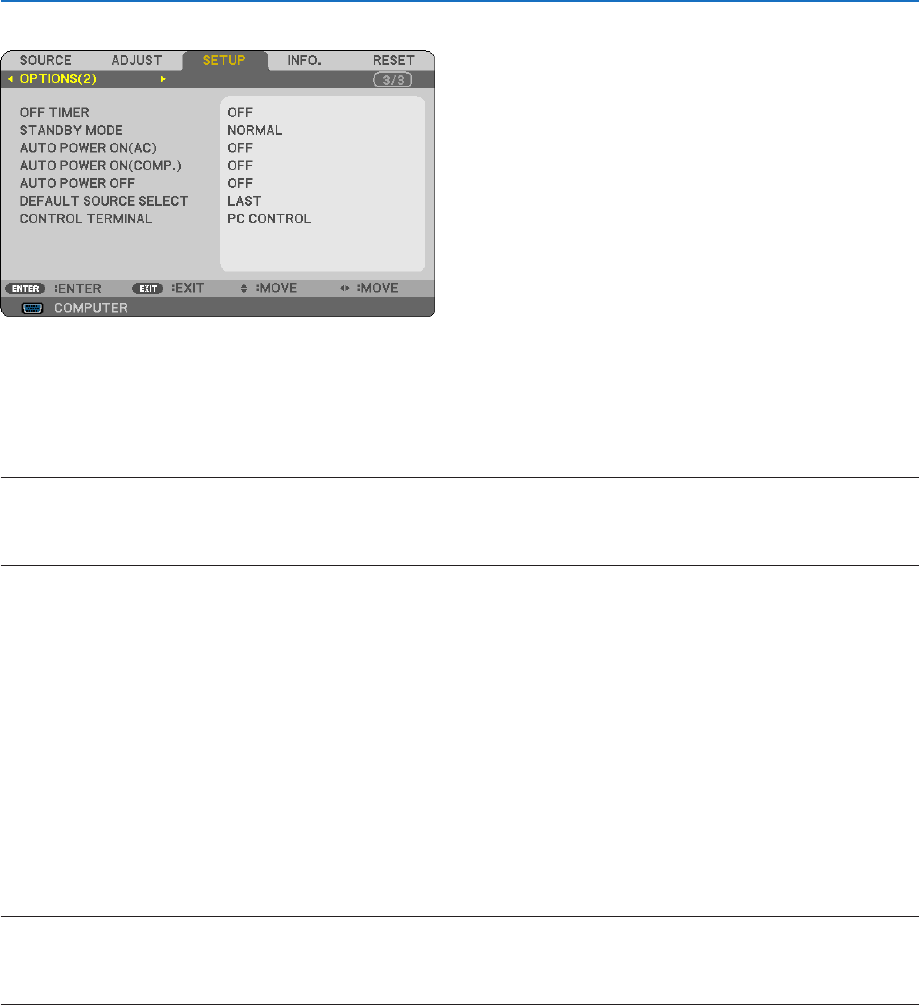
[OPTIONS(2)]
UsingOffTimer[OFFTIMER]
1. Select your desired time between 30 minutes and 16 hours: OFF, 0:30, 1:00, 2:00, 4:00, 8:00, 12:00, 16:00.
2. Press the ENTER button on the remote control.
3. The remaining time starts counting down.
4. The projector will turn off after the countdown is complete.
NOTE:
• Tocancelthepresettime,set[OFF]forthepresettimeorturnoffthepower.
• Whentheremainingtimereaches3minutesbeforetheprojectoristurnedoff,the[THEPROJECTORWILLTURNOFFWITHIN3
MINUTES]messagewillbedisplayedonthebottomofthescreen.
SelectingPower-savingin[STANDBYMODE]
Theprojectorhastwostandbymodes:[NORMAL]and[POWER-SAVING].
The POWER-SAVING mode is the mode that allows you to put the projector in the power-saving condition which
consumes less power than the NORMAL mode. The projector is preset for NORMAL mode at the factory.
NORMAL ................ Power indicator: Orange light/STATUS indicator: Green light
POWER-SAVING .... Power indicator: Red light/STATUS indicator: Off
The following connectors, buttons or functions will not work during this mode.
- PC CONTROL port, and COMPUTER OUT connector
- LAN and Mail Alert functions
- Buttons other than POWER button on the cabinet
- Buttons other than POWER ON button on the remote control
NOTE:
• When[CONTROLPANELLOCK],[CONTROLID],or[AUTOPOWERON(COMP.)]isturnedon,the[STANDBYMODE]settingis
not available.
• Yoursettingwillnotbeaffectedevenwhen[RESET]isdonefromthemenu.
EnablingAutoPowerOn[AUTOPOWERON(AC)]
Turns the projector on automatically when the power cable is inserted into an active power outlet. This eliminates the
need to always use the POWER button on the remote control or projector cabinet.