
Electronics America Portable Projector User's Manual



Table Of Contents
- INDEX
- Front cover
- Important Information
- 1. Introduction
- 2. Installation and Connections
- 3. Projecting an Image (Basic Operation)
- 4. Convenient Features
- (1) Turning off the Image and Sound
- (2) Freezing a Picture
- (3) Enlarging a Picture
- (4) Changing Eco Mode
- (5) Checking Energy-Saving Effect [CARBON METER]
- (6) Preventing the Unauthorized Use of the Projector [SECURITY]
- (7) Using the Optional Remote Mouse Receiver (NP01MR)
- (8) Network Setting by Using an HTTP Browser (NP215 only)
- 5. Using On-Screen Menu
- 6. Maintenance
- 7. Appendix
53
5. Using On-Screen Menu
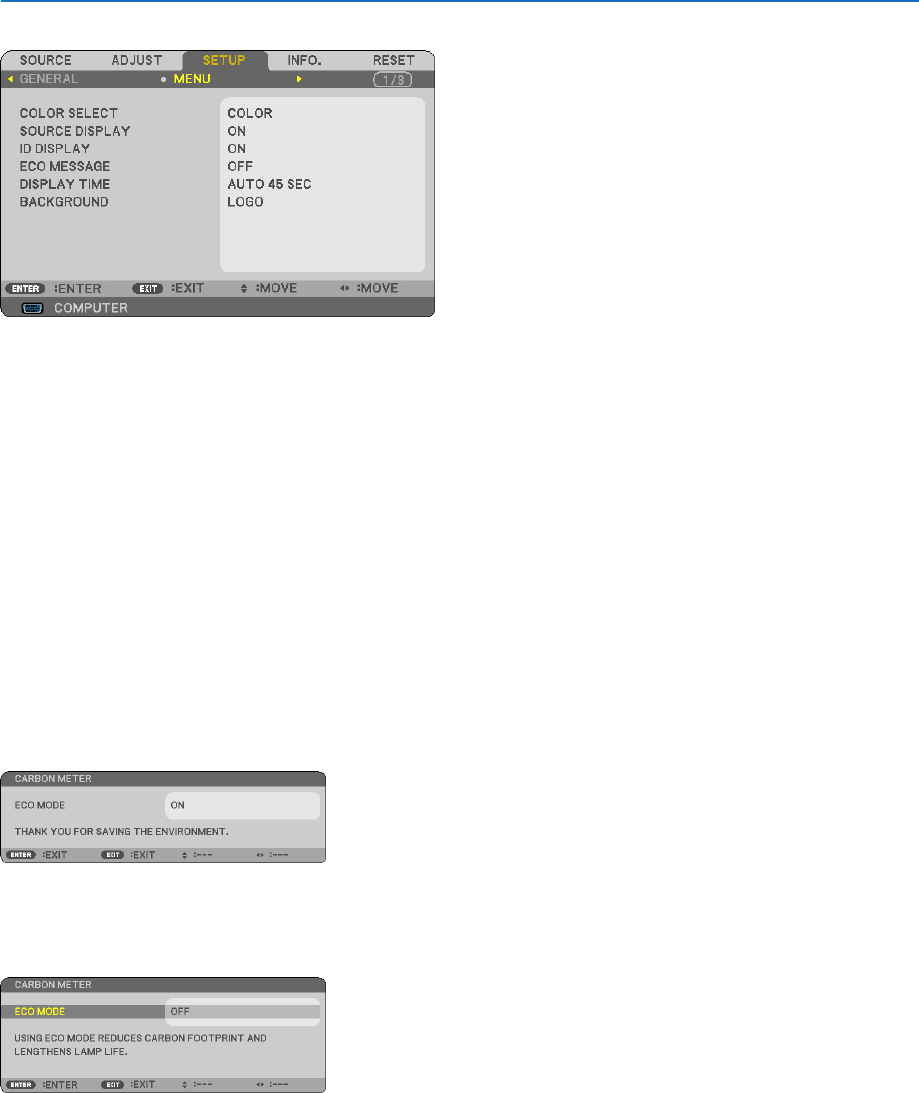
[MENU]
SelectingMenuColor[COLORSELECT]
You can choose between two options for menu color: COLOR and MONOCHROME.
TurningOn/OffSourceDisplay[SOURCEDISPLAY]
This option turns on or off input name display such as COMPUTER, VIDEO, S-VIDEO and No Input to be displayed
on the top right of the screen.
TurningON/OFFControlID[IDDISPLAY]
ID DISPLAY ........... This option turns on or off the ID number which is displayed when the ID SET button on the remote control
is pressed.
TurningOn/OffEcoMessage[ECOMESSAGE]
This option turns on or off the following messages when the projector is turned on.
TheEcoMessagepromptstheusertosaveenergy.When[OFF]isselectedfor[ECOMODE],youwillgetamessage
topromptyoutoselect[ON]for[ECOMODE].
When[ON]isselectedfor[ECOMODE]
To close the message, press the ENTER or the EXIT button. The message will disappear if no button operation is
done for 30 seconds.
When[OFF]isselectedfor[ECOMODE]
PressingtheENTERbuttonwilldisplaythe[ECOMODE]screen.(→ page 52)
To close the message, press the EXIT button.