
Electronics America Portable Projector User's Manual


Table Of Contents
- INDEX
- Front cover
- Important Information
- 1. Introduction
- 2. Installation and Connections
- 3. Projecting an Image (Basic Operation)
- 4. Convenient Features
- (1) Turning off the Image and Sound
- (2) Freezing a Picture
- (3) Enlarging a Picture
- (4) Changing Eco Mode
- (5) Checking Energy-Saving Effect [CARBON METER]
- (6) Preventing the Unauthorized Use of the Projector [SECURITY]
- (7) Using the Optional Remote Mouse Receiver (NP01MR)
- (8) Network Setting by Using an HTTP Browser (NP215 only)
- 5. Using On-Screen Menu
- 6. Maintenance
- 7. Appendix
49
5. Using On-Screen Menu
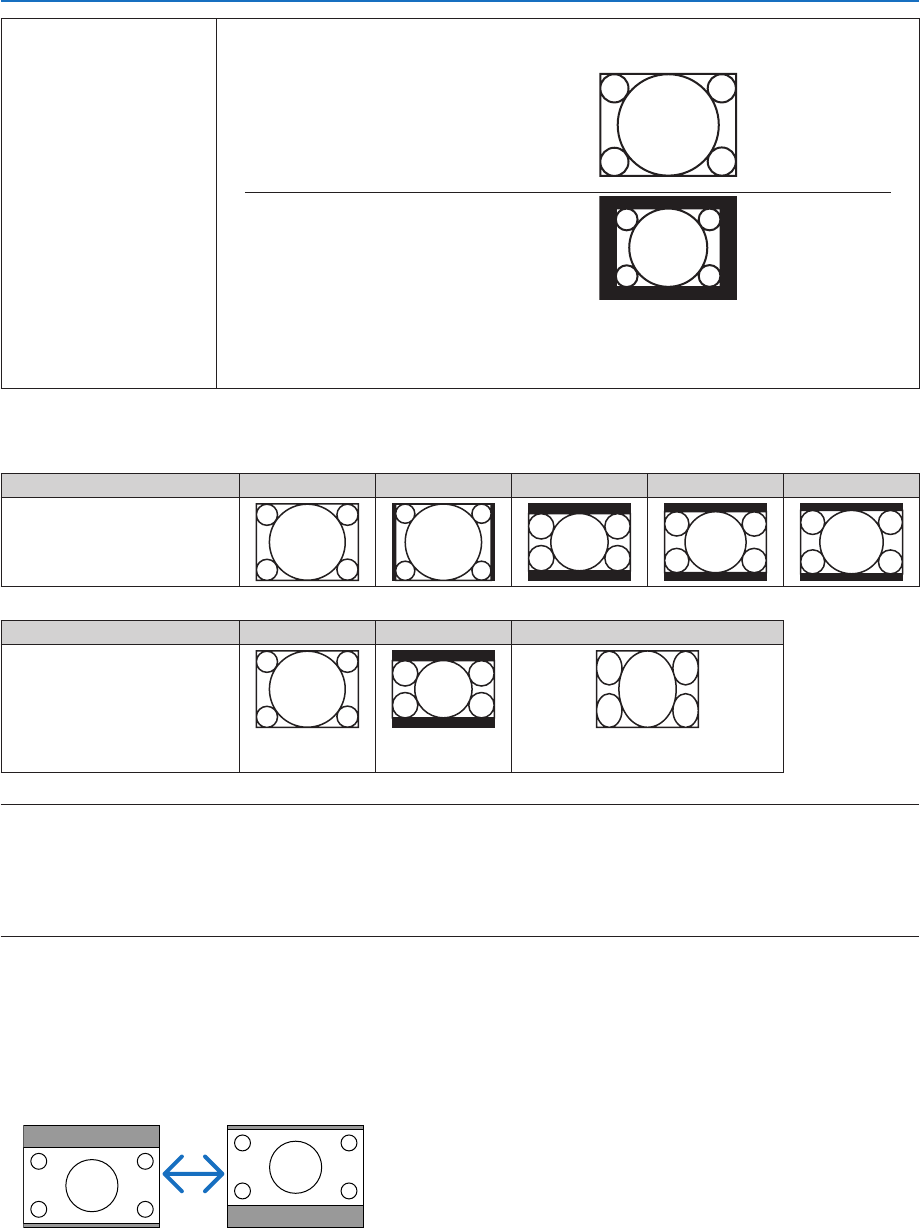
NATIVE The projector displays the current image in its true resolution when the incoming computer
signal has a lower resolution than the projector’s native resolution.
[Example1] When the incoming sig-
nalwiththeresolutionof800x600is
displayed on the NP115/NP110:
[Example2] When the incoming sig-
nalwiththeresolutionof800x600is
displayed on the NP215/NP210:
NOTE:
• Whenanon-computersignalisdisplayed,the[NATIVE]isnotavailable.
• Whenasignalwithahigherresolutionthantheprojector’snativeresolutionisdisplayed,[NATIVE]
is not available.
Sampleimagewhentheappropriateaspectratioisautomaticallydetermined
[Computersignal]
Aspect ratio of incoming signal 4:3 5:4 16:9 15:9 16:10
Sample image when the appro-
priate aspect ratio is automati-
cally determined
[Videosignal]
Aspect ratio of incoming signal 4:3 Letterbox Squeeze
Sample image when the as-
pect ratio is automatically de-
termined
NOTE:Todisplayasqueezedsignalprop-
erly,select[16:9]or[WIDEZOOM].
TIP:
• Imagepositioncanbeadjustedverticallyusing[POSITION]whenthe[16:9],[15:9],or[16:10]aspectratiosareselected.
• Theterm“letterbox”referstoamorelandscape-orientedimagewhencomparedtoa4:3image,whichisthestandardaspect
ratio for a vide source.
Theletterboxsignalhasaspectratioswiththevistasize“1.85:1”orcinemascopesize“2.35:1”formovielm.
• Theterm“squeeze”referstothecompressedimageofwhichaspectratioisconvertedfrom16:9to4:3.
AdjustingtheVerticalPositionofImage[POSITION]
(onlywhen[16:9],[15:9],or[16:10]isselectedfor[ASPECTRATIO])
When[16:9],[15:9],or[16:10]isselectedin[ASPECTRATIO],theimageisdisplayedwithblackbordersonthetop
and bottom.
You can adjust the vertical position from the top to the bottom of the black area.