
Electronics America Portable Projector User's Manual




Table Of Contents
- INDEX
- Front cover
- Important Information
- 1. Introduction
- 2. Installation and Connections
- 3. Projecting an Image (Basic Operation)
- 4. Convenient Features
- (1) Turning off the Image and Sound
- (2) Freezing a Picture
- (3) Enlarging a Picture
- (4) Changing Eco Mode
- (5) Checking Energy-Saving Effect [CARBON METER]
- (6) Preventing the Unauthorized Use of the Projector [SECURITY]
- (7) Using the Optional Remote Mouse Receiver (NP01MR)
- (8) Network Setting by Using an HTTP Browser (NP215 only)
- 5. Using On-Screen Menu
- 6. Maintenance
- 7. Appendix
38
4. Convenient Features
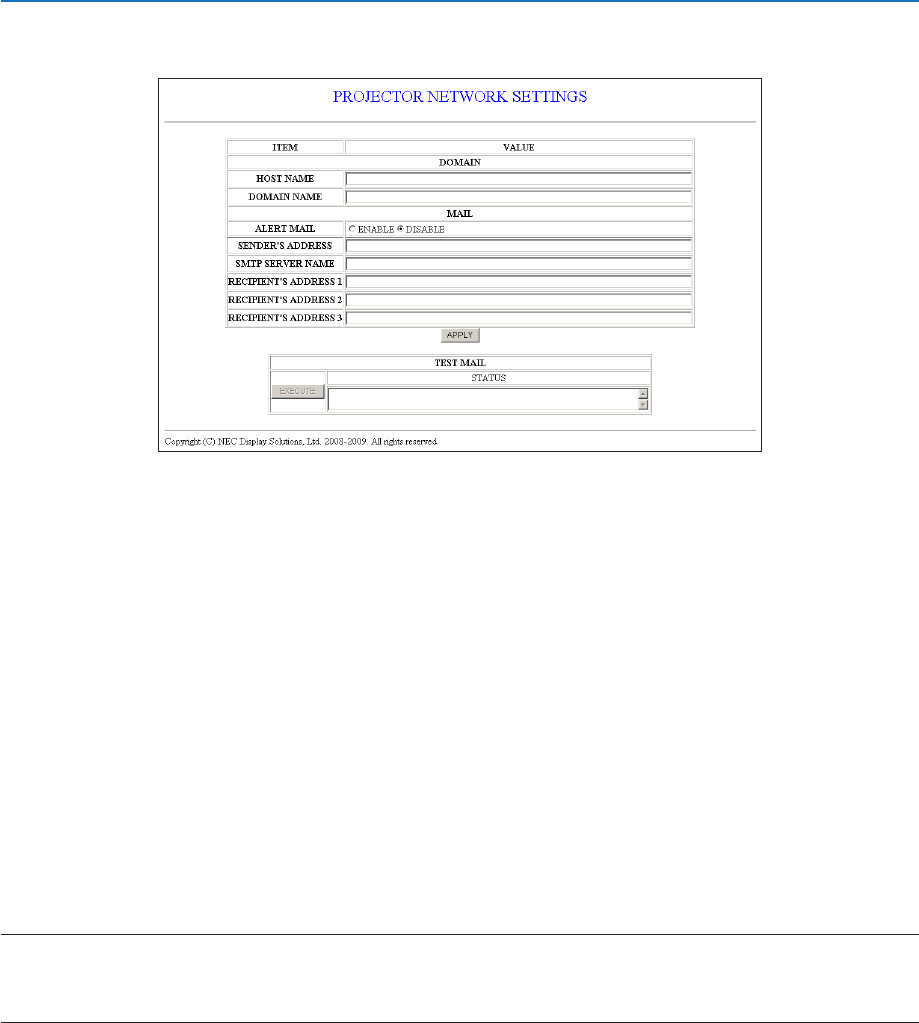
AlertMailSetting
http://<the projector’s IP address>/lanconfig.html
This option notifies your computer of an error message via e-mail when using wired LAN. An error message notification
will be sent when the projector lamp has reached the end of its usable life or an error occurs in the projector.
HOST NAME ............................ Type in the hostname of the network connected to the projector. Up to 60 alphanumeric char-
acters can be used. If the host name is unknown, type in a string of characters representing the
projector. Example: Projector 1
DOMAIN NAME ........................ Type in the domain name of the network connected to the projector. Up to 60 alphanumeric
characters can be used. If the domain name is unknown, type in the right side of @ in the sender’s
address. Example: nec. com
ALERT MAIL ............................. Checking [ENABLE] will turn on the Alert Mail feature.
Checking [DISABLE] will turn off the Alert Mail feature.
SENDER’S ADDRESS ................ Type in the senders address. Up to 60 alphanumeric and symbols characters can be used.
SMTP SERVER NAME ............... Type in the SMTP server name to be connected to the projector. Up to 60 alphanumeric characters
can be used.
RECIPIENT’S ADDRESS 1 to 3
.... Type in your recipient’s address. Up to 60 alphanumeric and symbols characters can be used.
APPLY ....................................... Click this button to reflect the above settings
EXECUTE .................................. Click this button to send a test mail to check if your settings are correct.
STATUS ..................................... A reply to a test mail will be displayed.
NOTE:
• Ifyouexecuteatest,youmaynotreceiveanAlertmail.Shouldthishappen,checkifthenetworksettingsarecorrect.
• Ifyouenteredanincorrectaddressinatest,youmaynotreceiveanAlertmail.Shouldthishappen,checkiftheRecipient’sAd-
dress is correct
TIP:TheAlertMailsettingswillnotbeaffectedevenwhen[RESET]isdonefromthemenu.