
Electronics America Portable Projector User's Manual




Table Of Contents
- INDEX
- Front cover
- Important Information
- 1. Introduction
- 2. Installation and Connections
- 3. Projecting an Image (Basic Operation)
- 4. Convenient Features
- (1) Turning off the Image and Sound
- (2) Freezing a Picture
- (3) Enlarging a Picture
- (4) Changing Eco Mode
- (5) Checking Energy-Saving Effect [CARBON METER]
- (6) Preventing the Unauthorized Use of the Projector [SECURITY]
- (7) Using the Optional Remote Mouse Receiver (NP01MR)
- (8) Network Setting by Using an HTTP Browser (NP215 only)
- 5. Using On-Screen Menu
- 6. Maintenance
- 7. Appendix
37
4. Convenient Features
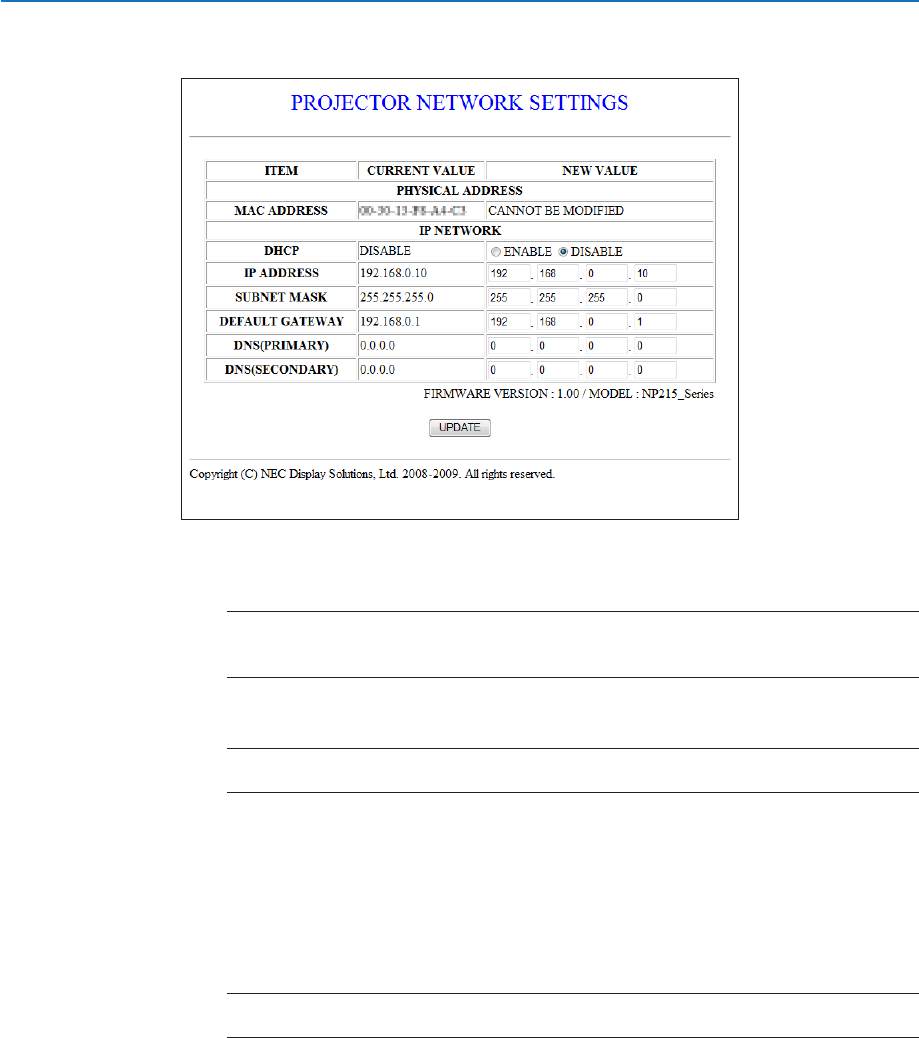
NetworkSettings
http://<the projector’s IP address> /index.html
DHCP ..................................Enabling this option automatically assigns an IP address to the projector from your DHCP server.
Disabling this option allows you to register the IP address or subnet mask number obtained from
your network administrator.
TIP:YoucanchecktheIPaddressinthemenuwhen[ENABLE]isselectedfor[DHCP].
Todoso,fromthemenu,select[INFO.]→[WIREDLAN]when[CONTROLTERMINAL]issetto
[LAN].
IP ADDRESS .......................Set your IP address of the network connected to the projector when [DISABLE] is selected for
[DHCP].
TIP:YoucancheckyourspeciedIPaddressinthemenu
Todoso,fromthemenu,select[INFO.]→[WIREDLAN].
SUBNET MASK ...................Set your subnet mask number of the network connected to the projector when [DISABLE] is selected
for [DHCP].
DEFAULT GATEWAY
................Set your default gateway of the network connected to the projector when [DISABLE] is selected for
[DHCP].
DNS (PRIMARY) .................Set your primary DNS settings of the network connected to the projector.
DNS (SECONDARY) .................
Set your secondary DNS settings of the network connected to the projector.
UPDATE ..............................Reflect your settings.
NOTE:Closethebrowserafter clicking [UPDATE].Theprojector will automatically update your
settings.
TIP:Selecting[NETWORKSETTINGS]for[RESET]fromtheprojector’smenuallowsyoutoreturnthefollowingitemstothefactory
default.
[DHCP]:DISABLE
[IPADDRESS]:192.168.0.10
[SUBNETMASK]:255.255.255.0
[DEFAULTGATEWAY]:192.168.0.1
*[DNS(PRIMARY)]and[DNS(SECONDARY)]willremainunchanged.