
Electronics America Portable Projector User's Manual


Table Of Contents
- INDEX
- Front cover
- Important Information
- 1. Introduction
- 2. Installation and Connections
- 3. Projecting an Image (Basic Operation)
- 4. Convenient Features
- (1) Turning off the Image and Sound
- (2) Freezing a Picture
- (3) Enlarging a Picture
- (4) Changing Eco Mode
- (5) Checking Energy-Saving Effect [CARBON METER]
- (6) Preventing the Unauthorized Use of the Projector [SECURITY]
- (7) Using the Optional Remote Mouse Receiver (NP01MR)
- (8) Network Setting by Using an HTTP Browser (NP215 only)
- 5. Using On-Screen Menu
- 6. Maintenance
- 7. Appendix
31
4. Convenient Features
Preventing the Unauthorized Use of the Projector [SECURITY]
AkeywordcanbesetforyourprojectorusingtheMenutoavoidoperationbyanunauthorizeduser.Whenakeyword
is set, turning on the projector will display the Keyword input screen. Unless the correct keyword is entered, the pro-
jector cannot project an image.
•The[SECURITY]settingcannotbecancelledbyusingthe[RESET]ofthemenu.
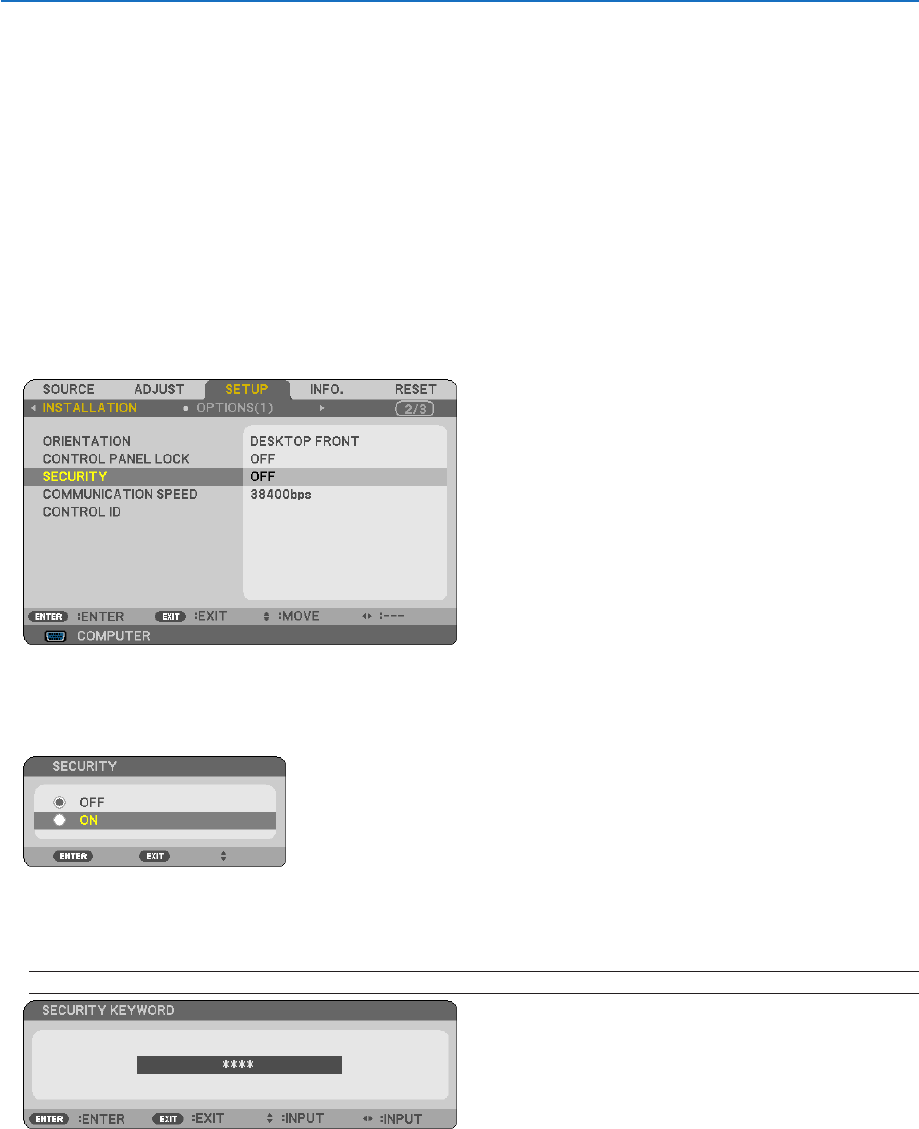
ToenabletheSecurityfunction:
1. Press the MENU button.
The menu will be displayed.
2. Press the button twice to select [SETUP] and press the button or the ENTER button to select [GEN-
ERAL].
3. Press the button to select [INSTALLATION].
4. Press the button three times to select [SECURITY] and press the ENTER button.
The OFF/ON menu will be displayed.
5. Press the button to select [ON] and press the ENTER button.
The [SECURITY KEYWORD] screen will be displayed.
6. Type in a combination of the four buttons and press the ENTER button.
NOTE: A keyword must be 4 to 10 digits in length.
The [CONFIRM KEYWORD] screen will be displayed.